Pipedrive Marketplace497 apps
search apps…
APPLE WATCHLIST
0manually curated
PIPEDRIVE APPS
497full marketplace
TOTAL TRACKED
497across 2 stores
TOP MOMENTUM
—highest score
TS
Textlocal SMS for Pipedrive
Ulgebra · Nurture my leads · Kostenpflichtig
Single and bulk Textlocal SMS from Pipedrive CRM with message history for each contact
REVIEWS
3
⌀ RATING
1.0
REVIEWS/TAG
—
REV/INSTALL
—
INSTALLS
—
MOMENTUM
—
FEATURES · WAS DIE APP KANN
- Textlocal SMS — Send Textlocal SMS
- Send Textlocal Message — Send single and bulk Textlocal messages
WETTBEWERB · NURTURE MY LEADS
| App | Reviews | Rating | Momentum |
|---|---|---|---|
| AlertBrew.com | 0 | 0.0 | — |
| Bonjoro | 3 | 4.0 | — |
| BulkSMS for Pipedrive | 0 | 0.0 | — |
| Burst SMS for Pipedrive | 1 | 2.0 | — |
| CloudTalk: AI Dialer & CTI for Pipedrive | 207 | 4.0 | — |
| Company Lookup by Dáváme | 0 | 0.0 | — |
| Company VAT Lookup | 1 | 5.0 | — |
| ControlHippo AI Chat Agents | 288 | 4.5 | — |
🤖 FEATURE-GAP · WO 20 % BESSER
Noch keine Analyse — „Analysieren" oben rechts startet sie.
💰 MONETARISIERUNG · LOHNT DER NACHBAU?
💰 MONETARISIERT
Kostenpflichtig
📈 MOMENTUM
—
📊 SKALA
—
SCREENSHOTS



BESCHREIBUNG
Integrate Textlocal SMS into your Pipedrive CRM to enhance your interactions. Try out the features listed below through the extension.
- [Send message](https://apps.ulgebra.com/pipedrive/textlocal-sms-integration-for-pipedrive#h.p25pt9maf2l1)
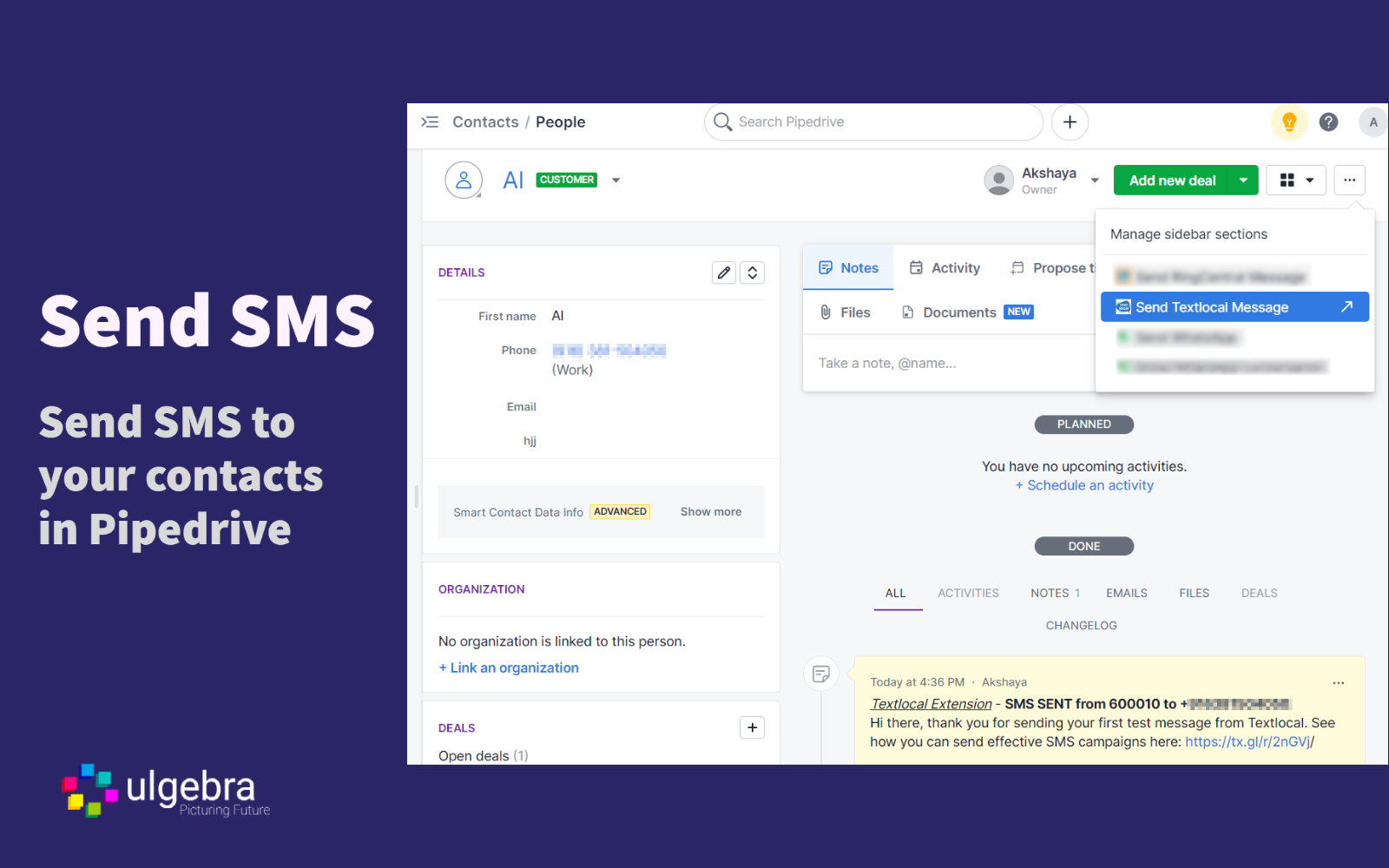
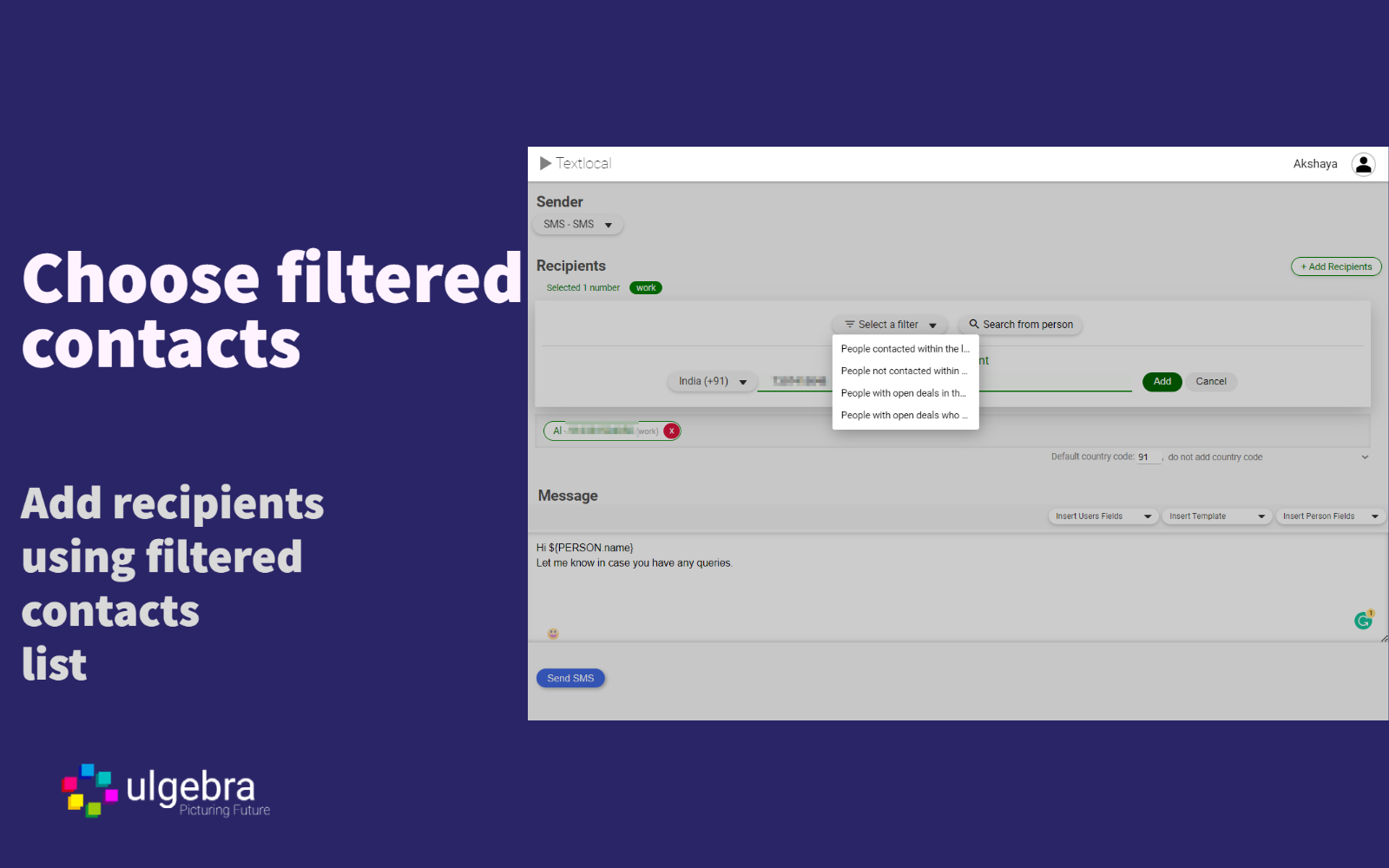
Send Textlocal messages from people, organizations and deals. Select any contact and click on "Send Textlocal Message" from the dropdown menu on the right. Select your sender and enter the message containing contact fields, user fields, templates and emojis. Send your Textlocal SMS.
- [Bulk Message](https://apps.ulgebra.com/pipedrive/textlocal-sms-integration-for-pipedrive#h.eu5ysb1gv8w4)
Select the people, organizations or deals and click on "Send Textlocal Message" from the dropdown menu to send a bulk message using placeholders, emojis and message templates.
- [Message History](https://apps.ulgebra.com/pipedrive/textlocal-sms-integration-for-pipedrive#h.zf41x)
View the history of Textlocal messages under the Notes section within the person, deal and organization.
- [Manage Pipedrive user](https://apps.ulgebra.com/pipedrive/textlocal-sms-integration-for-pipedrive#h.dc4kyw59lr36)
Click on your profile within the extension interface and select "Manage App Users." Here, Pipedrive admins can allow multiple users to use the Textlocal credentials entered. The admin can add or remove the required Pipedrive users.
REVIEWS (3)
★☆☆☆☆3.6.2025
not easy
★☆☆☆☆5.5.2025
I can not figure out how to use it
★☆☆☆☆9.11.2022
Paid to connect and worked through the matrix of all the different accounts to setup only to find that this doesn't work for American phone numbers. What a headache. No +1 phone numbers. Waste of time and money.